Comparison
The best WooCommerce product personalizer plugins in 2026
There is no single best plugin for personalized products, because shops that sell them want different things. A custom t-shirt shop needs a designer, a name gift shop needs a personalizer, a furniture shop needs a configurator, and a bakery taking cake messages needs a text field. This list sorts the main options by the shop each one suits.
Written by the maker of Pomp Product Personalizer, which is on this list. Prices and install counts are from wordpress.org, woocommerce.com and the makers’ own sites, checked in September 2026.
The short version
| If your shop | Look at | Price |
|---|---|---|
| Sells its own designs with the customer’s name, or prints the customer’s own text or logo | Pomp Product Personalizer | Free; Pro 99 euro a year |
| Lets customers lay out designs freely, with 3D | Zakeke | From $59 a month plus a fee per sale; no free plan |
| Lets customers lay out designs freely, self-hosted | Fancy Product Designer | $99 once, per site |
| Builds products from options and parts | Product Configurator for WooCommerce | Free, with paid add-ons |
| Needs text fields and options, no preview | Advanced Product Fields, PPOM, WooCommerce Product Add-Ons | Free to around 69 a year |
Personalizers: your design, their name
Pomp Product Personalizer
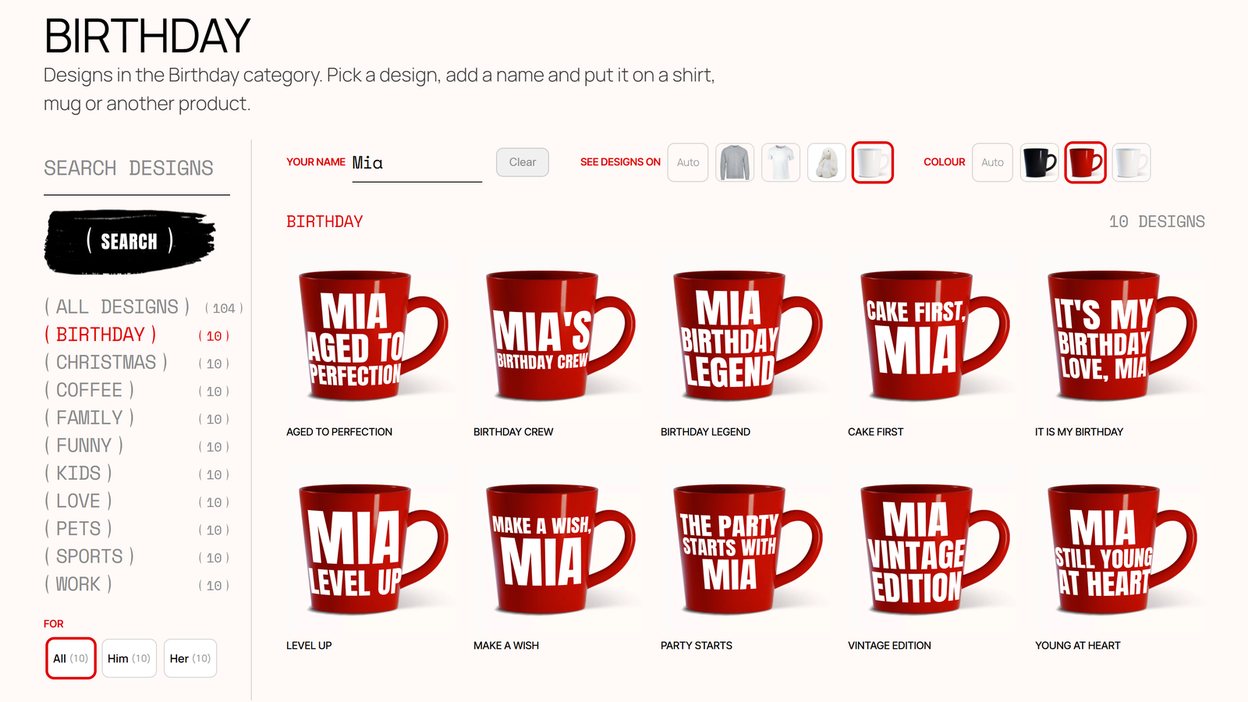
Built for shops that sell name mugs, birthday shirts, team wear, baby bodysuits and engraved gifts. You write each design once, as text with a place for the name, and it works on every product you have set up. Each product has its own print area, rotation, print colour per variation and a warp grid for curved surfaces, and each line of a design its own height, position, margins and colour, so a design looks right on a shirt and a mug alike (print placement and warp). The customer picks a design, types the name and sees it on a photo of the real product, bent to curved surfaces. Every order carries a print-ready SVG or PDF, as you choose, with the text converted to outlines, suited to vinyl, DTF, sublimation and laser. In Pro, print colours can be named as spot colours, PANTONE 186 C or White Ink, which the PDF carries as separate plates. It runs on your own server with no per-order fee, and it is light: the name is drawn in about 18 ms as it is typed, and the configurator adds about 76 kB of its own to the page. Pro lets the customer write their own text in full, line by line in the fonts you allow, or upload their own logo or picture as SVG or an image, checked and rebuilt for print and approved by you before the file is issued. It also adds a text field on the product page itself, and printing on up to five sides you name: a surname and number on the back, a logo on the chest, a name on one side of a mug and a photo on the other, each shown on its own photo and filled in on a step of its own.
Not for: shops whose customers want to drag several elements around a canvas, or who need a 3D model the customer can turn. Free on wordpress.org.
Product designers: a canvas for the customer
Zakeke
A hosted product designer with 2D and 3D previews, AR and virtual try-on, and prepress output as PDF, EPS or AI, with CMYK and Pantone on the larger plans. Plans start at $59 a month with 10 products, plus a fee of 1.5 to 1.9 % on each personalised sale; there is a 14-day trial and no free plan, so the plugin works only with a paid account. Around 2,000 WooCommerce shops use it, and it rates 4.7 on wordpress.org.
Not for: shops that want no monthly or per-sale cost, or their data on their own server. Pomp vs Zakeke goes into the difference.
Fancy Product Designer
A self-hosted designer sold on CodeCanyon for $99 per site, bought once. Customers work on a layered canvas with text, images and uploads, and designs export as PDF, SVG, JPG or PNG. Layered PDFs with embedded fonts come from its paid Pro Export service.
Not for: shops that want to install from wordpress.org, or whose customers only add a name. Pomp vs Fancy Product Designer compares the two.
Visual configurators: options and parts
Product Configurator for WooCommerce
Swaps layered images as the customer chooses options, so a sofa changes fabric or a ring changes stone. Free on wordpress.org with around 3,000 active installs and a 4.8 rating, with paid add-ons.
Text on the product, conditional logic and prices per option are paid add-ons; its Live Text Overlay add-on previews a customer’s text in your fonts and colours.
Not for: a catalogue of name designs that should work on every product; it is built around options, configured product by product.
Product add-ons: fields without a preview
Advanced Product Fields, PPOM and WooCommerce Product Add-Ons
Text fields, dropdowns, checkboxes, date pickers and prices per option on the product page. Advanced Product Fields is free for the basics and on more than 50,000 shops; PPOM is on more than 20,000; WooCommerce’s own Product Add-Ons costs around 69 a year. They save the customer’s text with the order. In their free versions the text is not drawn on the product (PPOM’s paid Pro adds a preview on the product image), and none of them lists a print-ready file with the order.
Not for: products where the customer pays for how the name looks. Pomp vs product add-ons sets out where each is the right tool.
How to decide
- Watch what your customers ask for. “Can you put my son’s name on this?” is a personalizer. “Can I send you my logo and move it left?” is a designer.
- Price it over three years. A monthly plan plus a fee per sale, a one-time licence, and a yearly licence come out very differently at your volume.
- Ask for the file. Order something on each vendor’s demo and look at what arrives. That file is what you will be printing from.
More on the difference between the kinds: WooCommerce product customizer or t-shirt designer: how to choose.